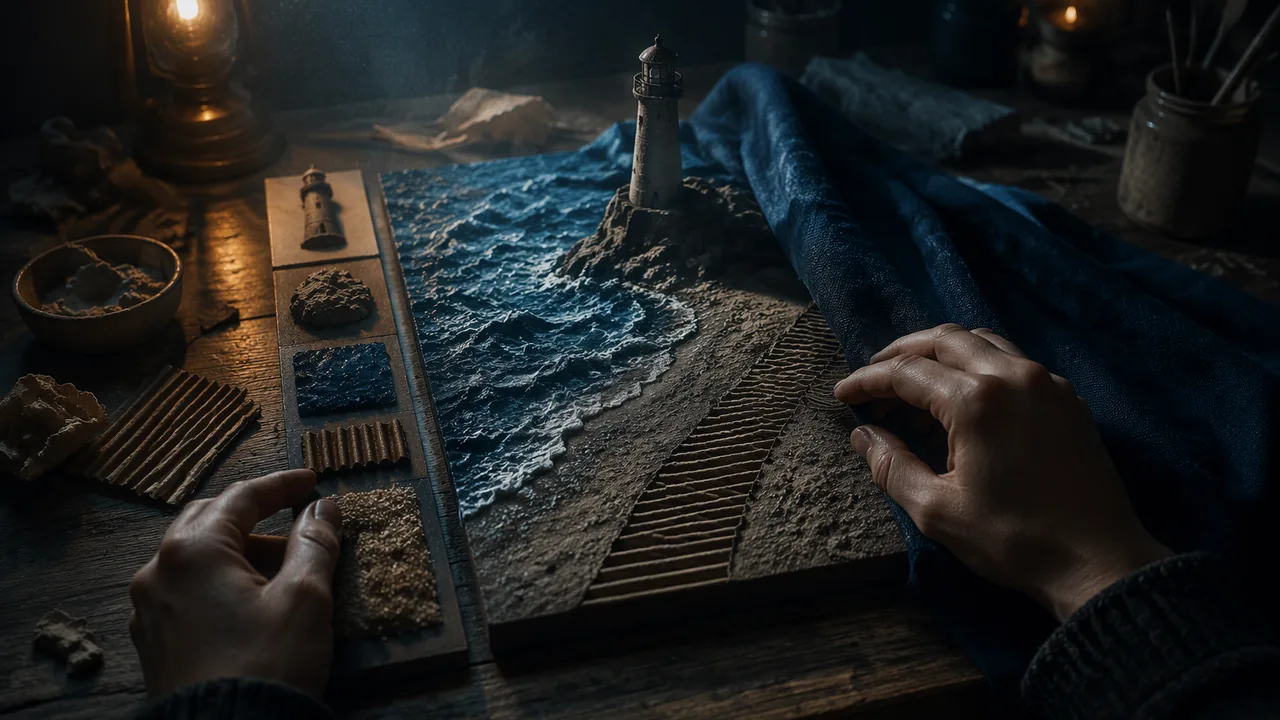
build, revise and defend a mixed-media relief panel that turns the implied textures of an AI image into actual textures a reader can identify with a key.
Instruction
This task brings together the unit’s three ideas: texture is a language, the machine image has only implied texture, and a tactile work must be readable. It also begins your semester portfolio, so treat the finished panel and its documentation as work you will present.
Building. Follow your build order from Lesson 2.4. Keep the base rigid. Let glue and clay set between layers; a panel built too quickly will peel. Leave a 3-4 cm strip along one edge for the key, and make each key sample from the same material as the region it names, not a similar one.
The touch test. At the halfway point a reader explores your panel with eyes closed or under a cloth: a family member or other adult, or you yourself after putting the panel away for a full day, reading with your non-dominant hand. The reader first explores the key, then try to find each texture in the panel and say what region it is. Record their results: how many textures they matched, which they confused, and what they said the panel showed. Aim for every texture to be matched. This is your critiqued draft.
Revision. Fix confusions first: raise a boundary, swap a texture, increase a contrast. Then check emphasis: did your reader find the main region first or early? Record each change in your sketchbook.
A worked example. Suppose your reader confused the beach (fine sandpaper) with the path (coarse sandpaper) and found the lighthouse only after the sea. Two revisions follow directly: replace the path with a directional texture such as corrugated card running along its length, so it no longer competes with the beach; and raise the lighthouse on a clay base so it is the highest point on the panel. Each revision answers a specific result, and each can be tested again.
Statement. In 250-350 words, credit the source image (tool, prompt, date). Compare what the AI image implied with what your panel actually gives the hand. Explain two texture choices, one by analogy and one by expression. Say what the touch test changed.
Selecting for the portfolio. Photograph the panel and three close-ups in raking light. Choose which views best show your decisions, and write captions. Selecting and captioning your own work is part of presenting it.
Defense. Present one texture decision in about two minutes, recorded, and answer one question (one from the reading’s defense outline if nobody is there to ask).
📖 Read for this lesson
The reading opens over the lesson; close it to come back to exactly where you were. The checks below draw on it.
Formative check
Work through these before moving on. They are not graded — they tell you whether the standard below has landed yet.
Record your touch test: textures matched, textures confused, what your reader said the panel showed, and whether they found the main region first. List your revisions with a reason for each.
Which photo set best documents a texture panel for a portfolio?
How confident are you that you can build a readable texture panel and explain my texture choices?
Submit: The Texture Translation Panel — finished panel with key, statement (250-350 words) and defense
Task: Translate an AI-generated image from the course image set (or your Lesson 1.1 route) into a relief panel at least 20 × 25 cm with at least five distinct actual textures from your library and a raised texture key along one edge. A reader using the key should be able to find every texture by touch.
Submission workflow
- Stage 1 — Plan. The Lesson 2.4 texture map, key design and build order.
- Stage 2 — Touch-tested work in progress. A reader (a family member or other adult, or you after a full day away) uses the key to identify each texture without sight; record results and a revision plan.
- Stage 3 — Final panel and statement. Finished panel, full view and three raking-light close-ups with captions, and a 250-350 word statement crediting the source image.
- Stage 4 — Defense. About two minutes presenting one texture decision, recorded, and answering one question.
How it is scored
| Criterion | What proficient looks like |
|---|---|
| Texture range and craft (VA:Cr2A.II) | Five or more distinct, well-attached textures; the base stays flat and the panel survives handling. |
| Translation and intent (VA:Cr1B.II) | Each region’s texture is chosen by analogy or expression with a clear reason. |
| Readability and emphasis (VA:Re9A.I) | Neighboring textures are distinct; the key works; the main region is found early. |
| Revision (VA:Cr3A.II) | Changes respond clearly to the touch test. |
| Portfolio presentation (VA:Pr4A.II) | Photos and captions are selected to show decisions. |
| Statement and defense (VA:Cn10A.II) | Credits the source; compares implied and actual texture with evidence. |
Portfolio Task 2: Key-Matching Test Form, Exemplar Entry and Reader’s Sheet
SLS original (exemplar is illustrative); image reproduced in a U.S. Copyright Office letter, 14 Feb 2022 · SLS original (illustrative exemplar)
Why this reading. Portfolio Task 2 gives you the assignment, stages and rubric. This reading supplies what a student cannot invent alone: a form for the key-matching touch test, an exemplar entry and a reader’s sheet. The exemplar is constructed (SLS original, illustrative), not any real student’s work.
Touch-test record: key matching
Give your reader (a family member or other adult) only the key first; let them explore it for up to two minutes. Then ask them to find each texture in the panel and name the region it fills. Do not help. If you are your own reader, put the panel away for a full day, then with eyes closed and your non-dominant hand touch one key sample, search the panel for it, and say aloud into a voice recorder which region you think it fills; take the key samples in a shuffled order (draw numbered slips from a cup) so memory of the layout helps you less. Record:
| Texture (key label) | Region the reader named | Correct? | Seconds |
|---|---|---|---|
| 1 (sandpaper) | |||
| 2 (bubble wrap) | |||
| … |
Then ask, “What do you think this shows?” and “Where did you look first?” and copy the answers word for word. Score: textures matched out of the number on the key; which pairs were confused; whether the main region was found first or early (first three finds).
Exemplar entry (illustrative)
Source label: A Recent Entrance to Paradise, generated by Steven Thaler’s Creativity Machine; U.S. Copyright Office letter, 14 February 2022. Test result: 5 of 6 textures matched; reader confused the outer arch (coarse sandpaper) with the ground (burlap); the green glow was the fourth find. Revisions: a raised string line 2 mm high between arch and ground; the glow lowered by another 2 mm and given a smooth pad around it; retest: 6 of 6 matched, glow found first.
Captions for three close-ups (illustrative): (1) “Key, left edge: six samples in the same materials as the regions they name.” (2) “Arch and ground with the string separator that fixed the confusion.” (3) “The glow, the only smooth region, set 5 mm below the tracks.”
Statement (about 250 words, illustrative): The AI image I chose, A Recent Entrance to Paradise, looks rough everywhere: its leaves, stone and gravel all appear grainy. That roughness is implied. It is a flat grid of pixels that a model learned to draw the way rough things usually look. My panel gives the hand actual textures instead, and it has to make them different from each other, because a fingertip cannot tell two similar roughnesses apart. I chose the outer arch’s coarse sandpaper by analogy: old stone is rough. I chose the smooth glazed clay for the green glow by expression: in the image the light is the point, and I wanted it to be the only smooth thing, so a hand slides into it. My first reader confused the arch with the ground, and found the glow fourth. I fixed the first by adding a raised string line between the two rough regions, and the second by lowering the glow and isolating it. The second reader found the glow first and matched every texture. What the image cannot do, and my panel can, is answer a question about where to look: it does not tell a hand where the light is; my panel does.
Defense outline (about two minutes)
One decision: what the image implied; what the panel gives; what the test showed; what you changed. One question to expect: “Why did you choose this texture for that region, and how would you know it was wrong?”
Reader’s sheet (for a family member or other adult, or for you after a day away)
- Did the key help you find every texture? Which did it not help with?
- Which two neighbors felt too alike?
- What did you find first? Is it the region the maker meant?
- Does anything peel, lift or crumble under your hand?
- One change that would help most: __________
Sources: U.S. Copyright Office Review Board letter on A Recent Entrance to Paradise, 14 Feb 2022 (copyright.gov)