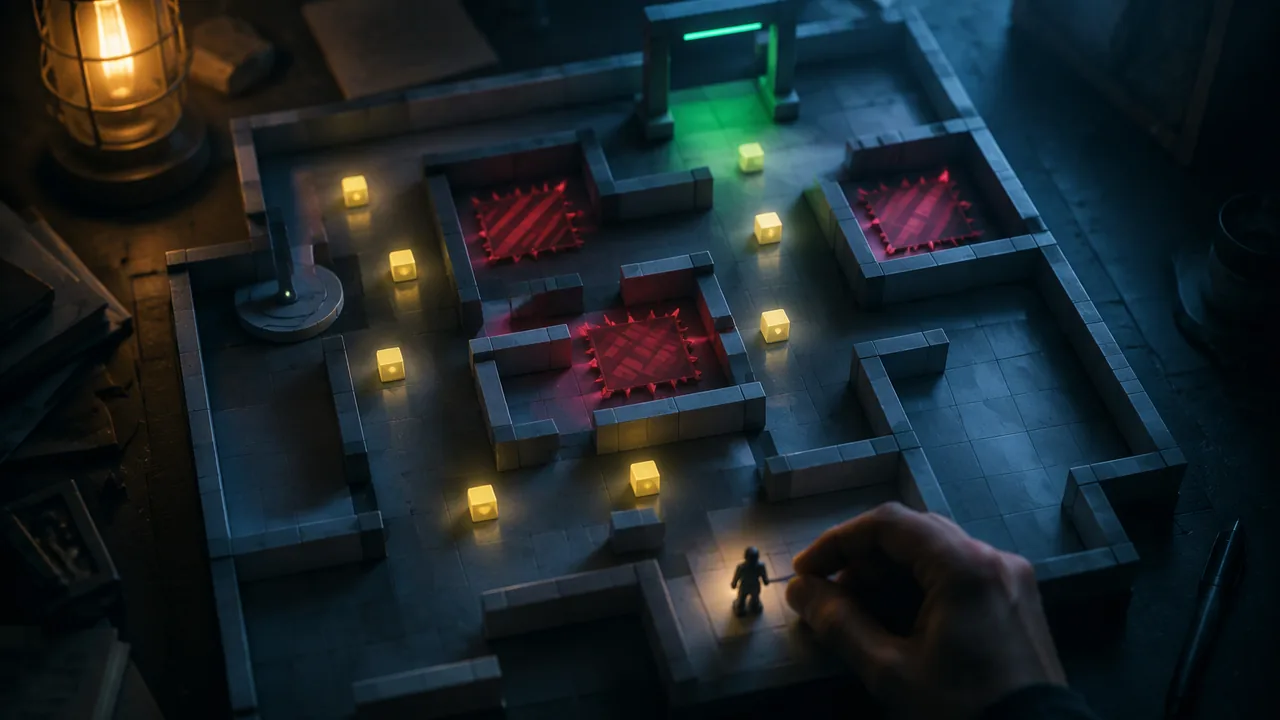
build a greybox level with reusable pickup, hazard and goal scenes that use signals and groups, so my core loop can be played from start to win.
Instruction
A prototype must be playable from start to finish, even if it is ugly: players need a goal, a way to fail and a way to win. Today you will build three reusable scenes, Pickup, Hazard and Goal, that you can drop into any level. (The pattern follows the Godot documentation’s pages on Area2D, groups and signals, CC BY 3.0.)
Greybox first. Use plain colored rectangles (a ColorRect or Kenney’s prototype textures): walls gray, hazards red, pickups yellow, goal green. Color-plus-shape coding matters for accessibility too: give hazards a spiky outline or a pattern, not just red.
Pickups use groups. Each pickup is an Area2D in the group pickups. When the player touches it, it removes itself:
extends Area2D

func _ready() -> void:
	add_to_group("pickups")
	body_entered.connect(_on_body_entered)

func _on_body_entered(body: Node2D) -> void:
	if body.is_in_group("player"):
		queue_free()
Because every pickup is in the same group, the goal can count how many remain without knowing where they are.
Hazards restart the level.
extends Area2D

func _ready() -> void:
	body_entered.connect(_on_body_entered)

func _on_body_entered(body: Node2D) -> void:
	if body.is_in_group("player"):
		print("Hazard hit at ", body.global_position)
		get_tree().reload_current_scene.call_deferred()
Two details matter. The print line writes to the Output panel, which is the simplest debugging tool you have: it tells you exactly where deaths happen, which becomes playtest data. And call_deferred() waits until the physics step has finished before reloading; reloading in the middle of a physics callback can cause errors, so deferring it is the safe habit.
The goal checks a win condition.
extends Area2D

@export var message_label: Label

func _ready() -> void:
	body_entered.connect(_on_body_entered)

func _on_body_entered(body: Node2D) -> void:
	if not body.is_in_group("player"):
		return
	var remaining := get_tree().get_nodes_in_group("pickups").size()
	if remaining == 0:
		message_label.text = "You win!"
	else:
		message_label.text = "%d left to collect" % remaining
	message_label.show()
@export var message_label: Label lets you choose the label in the Inspector by dragging it onto the property, so the goal scene works in any level. The early return leaves the function immediately if something other than the player arrives; it keeps the rest of the function unindented and readable.
Game states. Your prototype now has three states: playing, failed (which restarts) and won. Even simple games are easier to reason about when you can name their states and the events that move between them. Draw the three states as boxes and the events (touch hazard, touch goal with all pickups) as arrows. That diagram is your test plan: every arrow must be tested.
Build in the core loop only. Resist adding menus, art or extra levels. The prototype’s job is to answer the design questions from Lesson 1.1. Anything that does not help answer them can wait.
Test as you build. Turn on Debug > Visible Collision Shapes to see every collision shape while the game runs. Many “it doesn’t work” moments turn out to be a shape that is too small, in the wrong place or missing.
📖 Read for this lesson
The reading opens over the lesson; close it to come back to exactly where you were. The checks below draw on it.
Build: Greybox prototype of my core loop
Question. Can a first-time player go from start to win in your greybox prototype, and do the pickup, hazard and goal scenes behave correctly in every state change?
Materials
- A computer with the Godot 4 desktop editor (4.3 or later)
- Your platformer or top-down player scene from Semester A
- Kenney prototype textures or plain ColorRect nodes (CC0)
- Your design questions from Lesson 1.1 and a build log
- Keep ergonomic habits and 20-20-20 breaks.
- Avoid rapidly flashing hazard effects; they can trigger photosensitive seizures in some players.
- Zip a dated backup of the project at the end of each session.
Procedure
- Build Pickup.tscn, Hazard.tscn and Goal.tscn as Area2D scenes with a CollisionShape2D and a colored ColorRect or prototype sprite each, and attach the three scripts.
- Make a Level1.tscn greybox: StaticBody2D floors and walls, your player (in group player), five pickups, two hazards, a goal and a Label for messages. Assign the label to the goal’s Message Label property.
- Turn on Debug > Visible Collision Shapes and run. Check each shape matches its visible block.
- Test every state change on your state diagram: touch a hazard (level restarts), reach the goal early (message shows the count), collect all and reach the goal (win message). Record each test as passed or failed.
- Ask one family member or other adult you know to play from start to win without instructions while you watch silently, after reading them your consent script from Lesson 1.3 (a parent’s OK first if the tester is under 18). If nobody is available, take a break of at least a few hours, then play it yourself following only what the screen shows. Note where the player hesitates and read the hazard positions from the Output panel.
- Fix one problem that this play revealed and record the change in your build log.
Data
| Test (state change) | Expected | Result | Pass / fail |
|---|---|---|---|
| Touch hazard | Level restarts, Output shows position | ||
| Goal with pickups left | “n left to collect” | ||
| Goal with none left | “You win!” | ||
| Enemy or other body touches goal | Nothing happens |
Analysis
- Which state change failed first, and what caused it? How did Visible Collision Shapes or the Output panel help?
- Where did your tester (or you, in the self-test) hesitate or die most? What does that suggest about your level or your design questions?
- Why is it useful that the goal counts pickups through a group instead of a list of specific nodes?
If you cannot do this build in person: If you cannot use Godot, build the same level as a paper greybox on graph paper with colored squares, write the three scripts by hand, and run the state-change tests by moving a token while you read each script aloud (or play back a recording of yourself reading it) and say what happens.
Formative check
Work through these before moving on. They are not graded — they tell you whether the standard below has landed yet.
Why does the hazard script use get_tree().reload_current_scene.call_deferred() instead of calling reload_current_scene() directly?
To see every collision shape while the game runs, turn on Debug > Visible .
You forget to add the player to the group “player”. What happens when the player touches a pickup?
How confident are you that you can build reusable pickup, hazard and goal scenes and test every state change?
Practice
Work these on paper or in your notebook, then open Check your answer. Aim for all of Fluency and Application; try at least one Challenge.
Printable version: this unit’s practice workbook (PDF)
Fluency
Build speed and accuracy with the core skill.
- Give the color-plus-shape coding the lesson recommends for a greybox, and why shape matters as well as color.
Check your answer
Answer: Walls gray, hazards red (with a spiky outline or pattern), pickups yellow, goal green. Shape or pattern matters so the difference does not rely on color alone, for accessibility.Plain colored rectangles keep changes cheap and nobody mistakes the build for finished. - Name the three game states in the greybox prototype and the event that leads to each of the other two from playing.
Check your answer
Answer: Playing, failed and won. Touch a hazard → failed (the level restarts). Touch the goal with all pickups collected → won.Every arrow on the state diagram must be tested. - What do these do in the scripts: add_to_group(“pickups”), print(“Hazard hit at “, body.global_position), return at the top of the goal function?
Check your answer
Answer: add_to_group puts the pickup in a named group so the goal can count them; print writes the hazard position to the Output panel for debugging and playtest data; the early return leaves the function immediately if something other than the player arrives.The early return keeps the rest of the function unindented and readable.
Application
Use the skill in context. Show your reasoning.
- A level has five pickups. The player has collected two and touches the goal. What does the label show? What does it show after all five?
Check your answer
Answer: “3 left to collect”; then “You win!”get_nodes_in_group(“pickups”).size() counts pickups still in the tree: 5 − 2 = 3. At 0 the win branch runs. - Find the bug. A student’s goal says “You win!” even though pickups remain:
var remaining := get_tree().get_nodes_in_group(“pickup”).size()Check your answer
Answer: The group name is misspelled: the pickups join “pickups”, but the goal counts “pickup”, which has no members, so remaining is always 0. Use “pickups”.Group names must match exactly. Printing remaining to the Output panel would show the 0 at once. - Why does the hazard reload with reload_current_scene.call_deferred()? Explain in your own words.
Check your answer
Answer: Reloading while a physics callback is still running can cause errors. call_deferred() waits until the physics step has finished, at the end of the frame, then reloads safely.Deferring is the safe habit whenever a physics callback changes the scene tree. - The player sometimes walks right through a pickup without collecting it. Name the debugging tool from the lesson you would turn on first, and what you would look for.
Check your answer
Answer: Debug > Visible Collision Shapes. Look for a pickup or player shape that is too small, in the wrong place or missing.Many “it doesn’t work” moments turn out to be a collision shape problem. - Write the state-change test plan for the greybox as a list of four tests, each with its expected result.
Check your answer
Answer: 1. Touch a hazard: level restarts and the Output shows the position. 2. Reach the goal with pickups left: “n left to collect.” 3. Reach the goal with none left: “You win!” 4. Another body touches the goal: nothing happens.The state diagram is the test plan: each arrow and each guard gets a test.
Review
Keep earlier skills sharp.
- Review (Semester A): what does an Area2D do that a StaticBody2D does not?
Check your answer
Answer: An Area2D detects bodies entering and leaving it, and emits signals such as body_entered, without blocking them. A StaticBody2D blocks bodies but does not move.Pickups, hazards and goals are all Area2D scenes for this reason.
Greybox State Table and a Filled Test Record
SLS original test sheet; the build and results are invented · SLS original
Why this reading. The lab tests every state change of the three greybox scenes. This sheet gives the state table with the exact messages the code should print, and a filled test record with one failure so you can see what a useful entry looks like.
State table for Pickup, Hazard and Goal (matches the scripts in the lesson)
| Situation | Expected result | Message or output |
|---|---|---|
| Player touches a hazard | Level reloads, player back at start | Output line beginning Hazard hit at, with the position |
| Player reaches goal with pickups left | Level continues | 3 left to collect (if 5 pickups exist and 2 were taken) |
| Player reaches goal with none left | Win state | You win! |
| Anything not in group player touches any of the three | Nothing | No output |
The count is plain subtraction: with 5 pickups placed and 2 collected, the group holds 3, so the label reads 3 left to collect. If a pickup was collected on the same frame as the goal is touched, the count can lag by one, because queue_free removes the node at the end of the frame; note it as a known limit rather than a bug unless testers hit it.
A filled test record (SLS original, invented build 0.1.2)
| Test | Expected | Result | Pass or fail |
|---|---|---|---|
| Touch hazard | Level restarts, position printed | Restarted; position printed | Pass |
| Goal with 3 pickups left | 3 left to collect | Message read 5 left to collect | Fail |
| Goal with none left | You win! | You win! | Pass |
| Enemy body touches goal | Nothing | Nothing | Pass |
Reading the failure. The label said 5, the level has 5 pickups, and 2 had been collected, so the pickups were never removed. Likely cause: the player was touching them but the scene’s pickups sit in a group named pickup, not pickups. The fix is one word in add_to_group. Record both the cause and the retest result in your build log.
Test order that saves time: hazard first (it proves the player is in the right group), then goal early, then goal complete, then the negative case.