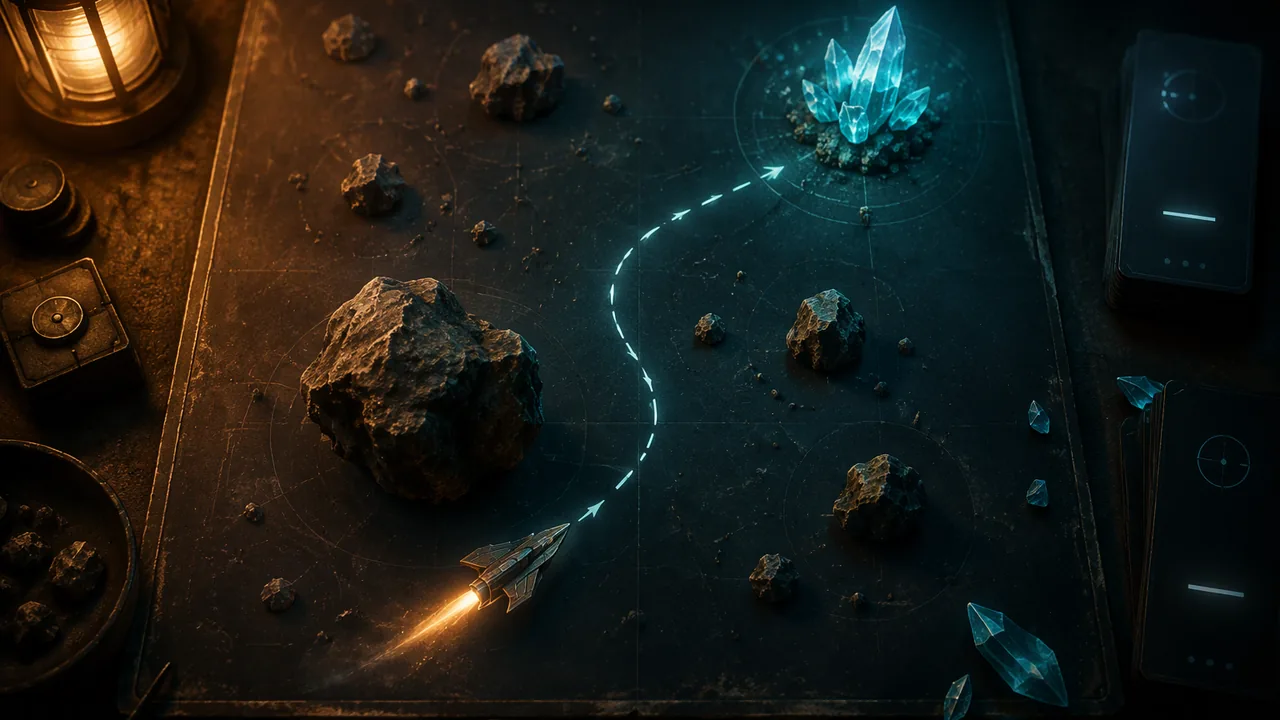
build a small game with a ship that rotates and thrusts in the direction it faces, bounces off obstacles with collision physics, and has a goal, building rocks and crystals as reusable scenes, while tracking my tasks on a board.
Instruction
Asteroids-style movement is a classic exercise because it needs three pieces of mathematics that every game programmer uses: angles, direction vectors and reflection. (Adapted from the “Rotation + movement” example in the Godot documentation’s “2D movement overview”, CC BY 3.0.)
Angles. Godot measures rotation in radians. A full turn is 2π ≈ 6.28 radians, and 90° is π/2 ≈ 1.57. If the ship turns at 3.0 radians per second, a full turn takes 6.28 ÷ 3.0 ≈ 2.1 seconds. That number is a design choice: faster turning feels nimble; slower turning makes aiming a skill.
Facing direction. Every node has a transform, and transform.x is a vector of length 1 pointing the way the node’s own x-axis points, which is “forward” if your sprite is drawn facing right. At rotation 0 it is (1, 0). At 30° it is (cos 30°, sin 30°) ≈ (0.866, 0.5), pointing right and slightly down, because y grows downward. Multiplying it by a speed gives a velocity in the facing direction.
extends CharacterBody2D

@export var thrust: float = 300.0
@export var rotation_speed: float = 3.0
@export var max_speed: float = 400.0

func _physics_process(delta: float) -> void:
	rotation += Input.get_axis("ui_left", "ui_right") * rotation_speed * delta
	if Input.is_action_pressed("ui_up"):
		velocity += transform.x * thrust * delta
	velocity = velocity.limit_length(max_speed)
	var collision := move_and_collide(velocity * delta)
	if collision:
		velocity = velocity.bounce(collision.get_normal()) * 0.8
		var rock := collision.get_collider() as RigidBody2D
		if rock:
			rock.apply_central_impulse(-collision.get_normal() * 60.0)
Thrust adds to velocity, so the ship drifts like a real spacecraft: holding thrust for half a second from rest at 30° gives 300 × 0.5 = 150 px/s in the facing direction, which is (150 × 0.866, 150 × 0.5) ≈ (130, 75). limit_length caps speed at 400 px/s, which from rest takes 400 ÷ 300 ≈ 1.3 s of thrust.
Collision and reflection. This time we use move_and_collide, which stops at the first contact and returns information about it. get_normal() is the direction pointing straight out of the surface that was hit. bounce reflects the velocity off that surface, like a ball off a wall: a ship moving (200, 0) into a wall whose normal is (−1, 0) comes back at (−200, 0), and the 0.8 factor removes a fifth of the speed, to (−160, 0). The as RigidBody2D cast gives null unless the thing hit is a physics-driven rock; if it is a rock, the ship also pushes it away with an impulse, so the rocks drift and spin as real objects would.
Rocks and randomness. Each rock is a RigidBody2D scene whose script turns off gravity and gives it a random drift and spin in _ready():
extends RigidBody2D

func _ready() -> void:
	gravity_scale = 0.0
	angular_velocity = randf_range(-1.5, 1.5)
	linear_velocity = Vector2.RIGHT.rotated(randf_range(0.0, TAU)) * randf_range(30.0, 90.0)
TAU is 2π, so the drift direction is any angle at all. Randomness makes each round different; ranges keep it fair.
Reusable scenes. You will build one rock and use it six times. In Godot a saved scene (a .tscn file, a “packed scene”) works as a blueprint, and each copy placed in another scene is an instance; the Godot manual calls replicating an object from a template like this instancing. It is the same idea as a reusable symbol in animation software: build the button, rock or coin once, then place it many times. Two rules make it powerful. Change the source scene (open Rock.tscn, change its sprite or collision shape and save) and every instance in the project updates. Change one instance in the Inspector and only that copy changes; Godot marks the override with a grey revert icon, and the override survives later edits to the source. Your spawner does the same thing in code: rock_scene.instantiate() makes a new instance each time it is called. Make the crystal, the walls and a restart button reusable scenes too, and your next game can start from them.
A goal makes it a game. Reuse your coin scene from Lesson 2.2 as crystals: collect five before a 60-second timer runs out. Surround the arena with four StaticBody2D walls using WorldBoundaryShape2D so nothing escapes.
Tracking the work. Break the build into cards on a board (To do, Doing, Done): ship scene, ship script, rock scene, rock spawner, walls, crystals and timer, testing. Move cards as you go, and write one line in your build log whenever something breaks and how you fixed it.
📖 Read for this lesson
The reading opens over the lesson; close it to come back to exactly where you were. The checks below draw on it.
Build: Rotate-and-thrust ship with collision physics
Question. Can you implement a ship that rotates about its center, moves in the direction it faces, and collides with walls and rocks in a physically believable way, inside a game with a clear goal?
Materials
- A computer with the Godot 4 desktop editor (4.3 or later)
- Kenney space sprites (CC0) for a ship facing right, rocks and a crystal
- Your coin scene and timer code from Lesson 2.2
- A paper or digital task board with three columns
- Keep ergonomic habits and 20-20-20 breaks; this build spans two sessions.
- Test fast-moving or flashing effects briefly first; if anything flickers rapidly, slow it down, as rapid flashing can trigger photosensitive seizures in some people.
- Zip a dated backup at the end of each session.
Procedure
- Write the task cards on your board and estimate each.
- Make Ship.tscn (CharacterBody2D, Sprite2D facing right, CollisionShape2D) and type the ship script. Make Rock.tscn (RigidBody2D, Sprite2D, CollisionShape2D with a CircleShape2D) and type the rock script.
- Make Arena.tscn with a Node2D root, the ship at the center, and four StaticBody2D walls, each with a CollisionShape2D using WorldBoundaryShape2D (set each boundary’s normal to point into the arena). Add a spawner script to the root with @export var rock_scene: PackedScene and a loop in _ready() that instantiates six rocks at random positions away from the center; assign Rock.tscn in the Inspector.
- Add five crystals (your coin scene) and a 60-second Timer with a label; the player wins by collecting all five in time.
- Test reuse: open Rock.tscn, change its sprite (or its CircleShape2D radius) and save, then run Arena.tscn and confirm all six rocks changed. Then select one crystal instance in Arena.tscn, change only its scale, and note the grey revert icon that marks the override.
- Playtest: check that the ship turns in about 2.1 seconds per full circle at rotation_speed 3.0, that bounces reverse the correct component of velocity, and that rocks move when struck.
- Tune one value (thrust, rotation_speed, bounce factor or rock speed) for a target feel, and record before and after in your build log.
Data
| Check | Predicted | Observed |
|---|---|---|
| Time for a full turn at rotation_speed 3.0 | ≈ 2.1 s | |
| Thrust time from rest to max speed (300 px/s², cap 400 px/s) | ≈ 1.3 s | |
| Speed after one wall bounce from 200 px/s head-on | 160 px/s | |
| Rocks changed after editing Rock.tscn once | 6 of 6 | |
| Your tuning change |
Analysis
- Explain, using transform.x, why the ship moves in the direction it faces rather than always to the right.
- Describe one collision that looked wrong or surprising, and explain the cause using the collision normal.
- Compare your task estimates with the actual times. Which task took longest, and why?
- Name three objects in your game that are instances of one reusable scene, and explain how editing the source scene once saved you work.
If you cannot do this build in person: Without Godot, complete the mathematics on paper: compute transform.x for rotations of 0°, 45°, 90° and 180°; compute the velocity after 0.5 s of thrust at each; and draw a ship moving at (200, 100) hitting a floor with normal (0, −1), showing the bounced velocity with the 0.8 factor, (160, −80).
Formative check
Work through these before moving on. They are not graded — they tell you whether the standard below has landed yet.
The ship’s rotation is π/2 (90°). In Godot 2D, which way does transform.x point?
A ship moving at (120, -90) hits a wall whose normal is (-1, 0). After bounce() the velocity is (, -90), and after multiplying by 0.8 it is (-96, ).
Using randf_range for rock speed means every round of the game has the same layout.
Missouri standard: MM.ANI.2
Your arena holds six instances of Rock.tscn. You open Rock.tscn, give the rock a new sprite and save. What happens?
How confident are you that you can build a rotate-and-thrust game with collision physics and a goal?
Practice
Work these on paper or in your notebook, then open Check your answer. Aim for all of Fluency and Application; try at least one Challenge.
Printable version: this unit’s practice workbook (PDF)
Fluency
Build speed and accuracy with the core skill.
- Convert: (a) 180° to radians; (b) 90° to radians; (c) at rotation_speed 2.0 rad/s, how long is a full turn?
Check your answer
Answer: (a) π ≈ 3.14; (b) π/2 ≈ 1.57; (c) about 3.1 s.A full turn is 2π ≈ 6.28 radians. 6.28 ÷ 2.0 = 3.14 s. - Give transform.x for a ship at rotation 0°, 180° and −90°, and say which way each points on screen.
Check your answer
Answer: 0°: (1, 0), right. 180°: (−1, 0), left. −90°: (0, −1), up.transform.x = (cos θ, sin θ). y grows downward, so (0, −1) points up. - What do these mean in the ship lesson: collision normal, impulse, TAU?
Check your answer
Answer: Collision normal: a vector pointing straight out from the surface at the contact point. Impulse: a sudden push that changes a body’s velocity at once. TAU: 2π, a full turn in radians.The rock script uses TAU so the drift direction can be any angle.
Application
Use the skill in context. Show your reasoning.
- The ship starts at rest facing 90° (down the screen) with thrust 300 px/s². What is its velocity after holding thrust for 0.5 s?
Check your answer
Answer: (0, 150): 150 px/s straight down the screen.transform.x at 90° is (0, 1). velocity = (0, 1) × 300 × 0.5 = (0, 150). - A ship moving at (150, 200) hits a floor whose normal is (0, −1). What is its velocity after bounce(), and after the 0.8 factor?
Check your answer
Answer: After bounce: (150, −200). After × 0.8: (120, −160).Bouncing off a floor reverses the y component only. 150 × 0.8 = 120 and −200 × 0.8 = −160. - With thrust 250 px/s² and max_speed 400 px/s, how long does the ship need to thrust from rest to reach the cap? Which line enforces the cap?
Check your answer
Answer: 1.6 s; velocity = velocity.limit_length(max_speed).400 ÷ 250 = 1.6 s. limit_length shortens the velocity vector to at most max_speed. - The rock script sets linear_velocity = Vector2.RIGHT.rotated(randf_range(0.0, TAU)) * randf_range(30.0, 90.0). Describe in words the slowest and fastest a rock can drift, and in which directions.
Check your answer
Answer: Between 30 and 90 px/s, in any direction at all.Rotating the right-pointing unit vector by a random angle from 0 to TAU (a full turn) gives any direction; the second randf_range sets the speed. Ranges keep the randomness fair. - Write the build as task cards for a To do / Doing / Done board (at least five cards), and say what you record in the build log when something breaks.
Check your answer
Answer: Model cards: ship scene; ship script; rock scene; rock spawner; walls; crystals and timer; testing. In the build log, one line for each break: what broke and how you fixed it.Moving cards as you go shows progress; comparing estimates with actual times improves planning.
Challenge
Stretch problems. Expect to think before you write.
- A ship moving at (200, 100) hits a right-hand wall whose normal is (−1, 0). Give the velocity after the bounce with the 0.8 factor, and explain in one sentence why only one component changed sign.
Check your answer
Answer: (−160, 80). Reflection reverses only the component along the normal (here x); the component along the wall (y) is kept, and the 0.8 factor scales both.bounce gives (−200, 100); × 0.8 = (−160, 80).
Review
Keep earlier skills sharp.
- Review (Lesson 3.3): what is coyote time for, and what usability problem does it solve?
Check your answer
Answer: It allows a jump for a brief moment after leaving a ledge. Players often press jump a split second late and feel cheated when nothing happens.The feature already works; coyote time makes it usable and fair.
The Rotate-and-Thrust Ship: Frame-by-Frame Numbers to Check Your Build
SLS original; values computed by SLS and cross-checked in Godot 4.7.2 (headless) · SLS original
Why this reading. The build has you code rotation, thrust with a speed cap, and a bounce, and asks you to check that it behaves. This sheet gives the numbers for the exact script in the lesson (thrust 300, rotation speed 3.0, max speed 400, 60 fps, starting at rest at the origin) so you can compare your build with a hand-checked result. Godot 4.7.2 gave the same values in a headless test.
Turning
3.0 radians per second is 3.0 ÷ 60 = 0.05 radians per frame, or 2.865 degrees. A full turn (6.283 radians) takes 6.283 ÷ 3.0 = 2.09 s, about 126 frames. A quarter turn (π/2 = 1.571 radians) takes about 31 frames.
Thrust straight ahead (rotation 0, facing right)
Each frame adds 300 ÷ 60 = 5 px/s to the speed. There is no drag in this script, so the ship never slows on its own.
| Frame | Speed x (px/s) | Position x (px) |
|---|---|---|
| 1 | 5 | 0.08 |
| 2 | 10 | 0.25 |
| 3 | 15 | 0.50 |
| 4 | 20 | 0.83 |
| 5 | 25 | 1.25 |
| 6 | 30 | 1.75 |
After 60 frames (1 s): speed 300, x = 152.5. Top speed 400 is reached on frame 80 (400 ÷ 5), where x = 270.0. Then it cruises at 400 ÷ 60 = 6.67 px per frame: after 120 frames x = 536.7 (270 + 40 × 6.67).
Thrust at 30 degrees (rotation 0.5236 rad)
The facing vector is (cos 30°, sin 30°) = (0.866, 0.5). After 30 frames of thrust (0.5 s) from rest: speed = 150 px/s, velocity = (129.9, 75.0), position = (33.6, 19.4). The sum of the frame-by-frame distances is 5 × (1 + 2 + … + 30) ÷ 60 = 38.75 px, times (0.866, 0.5).
Turn first, then thrust
Hold right for 20 frames: rotation = 20 × 0.05 = 1.0 rad (57.3°). Then thrust for 30 frames: velocity = 150 × (cos 1.0, sin 1.0) = 150 × (0.5403, 0.8415) = (81.0, 126.2), position = 38.75 × (0.5403, 0.8415) = (20.9, 32.6).
Bounce
| Before | Wall normal | After bounce() | After × 0.8 |
|---|---|---|---|
| (200, 0) | (−1, 0) | (−200, 0) | (−160, 0) |
| (120, −90) | (−1, 0) | (−120, −90) | (−96, −72) |
| (100, 80) | (0, −1), a floor | (100, −80) | (80, −64) |
Bounce flips the component that points into the wall and keeps the rest. Losing 20 percent each bounce means a ship at 400 px/s retains 400 × 0.8 = 320 px/s after one and 256 after two.
Task board (example) and build-log lines
To do: rock spawner, walls, crystals and timer. Doing: rock scene. Done: ship scene, ship script. Log: “Ship spun the wrong way. Cause: I had ui_left and ui_right swapped in get_axis. Fixed; pressed right for 31 frames, rotation reached about 90 degrees.” The goal: 5 crystals in 60 seconds is 12 seconds per crystal; crossing the 1152-pixel arena at top speed takes 1152 ÷ 400 = 2.9 seconds.